

Reading the Quran on a phone can be steady, focused, and easy to resume. The key is not finding the most elaborate reader. It is creating a predictable page, choosing a readable unit, and leaving yourself a precise trail back to the last confirmed location. When your screen, text size, orientation, and saved reference stay consistent, a short reading session is much less likely to turn into a search for where you were.
This guide explains how to read Quran on your phone without relying on a disappearing scroll position. It is app-agnostic: the labels may differ, and other apps may handle bookmarks differently, but the method remains the same. Read what is clearly visible, pause before changing screens, and record the surah and ayah you have actually confirmed.
Build a stable view to read Quran on your phone
Before starting, make the Arabic comfortable to inspect. Increase the Arabic text until letters and marks are distinct, then check a complete word near the middle and bottom of the screen. A large setting is not useful if the final letter or mark is clipped, or if line spacing forces constant panning. Look at the whole word, not just the first few characters. If the reader offers several scripts or editions, choose one you can recognise consistently; this background on Quran script differences can help you make that choice deliberately.
Keep the view stable while reading. Lock the orientation if rotating the phone changes the line breaks, and avoid switching between compact and spacious layouts during one session. A stable font and page width make the visible text a better recovery clue later. If the app shows a translation, tafsir, controls, or several panels, reduce the extra material when it crowds the Arabic. Do not erase labels that identify the surah, ayah, page, or edition. Those labels are useful evidence when you return. Keep pause marks visible too; this overview of Quran waqf signs explains why they belong in the reading view.
Scroll a little before you begin so the readable unit is fully in view. That unit might be a short passage or a complete visible section; it does not need to be an arbitrary number of verses. The point is to avoid starting with the first line half-hidden under a toolbar. Likewise, do not turn screen reading into a race to an imposed stopping point. A calm, readable pause is more useful than a forced one. For ideas about maintaining a measured pace, see reading fluency without rushing.
Separate reading position from audio and page position
A phone reader may show three different kinds of position: the text currently on screen, an audio player’s highlighted location, and a page or scroll location. They can support one another, but they are not interchangeable. An audio highlight may mark a whole ayah while the recitation is moving through a particular word. A page view may return to the same screen without proving which line you finished. Treat the last clearly read and confirmed ayah as your primary reference.
If you listen as well as read, use audio to support attention rather than as proof of an exact word position. Some players highlight an entire ayah or update in steps, so do not overpromise precision from the highlight alone. Listening can still be a valuable part of practice; this discussion of learning by listening alone gives that activity its own context.
Save a recoverable location before leaving
At the end of a session, save the surah and ayah you have confirmed. Add a short label that distinguishes completed from next to read. For example, “Al-Baqarah 2:18 — completed” says what you finished; “Al-Baqarah 2:19 — next to read” says where to start next. Saving both can prevent the common uncertainty between the last line read and the next line intended.
Remember that a page number may depend on the selected Quran edition. A page reference can be helpful only when the same edition and display are used again, so pair it with the surah and ayah. A bookmark feature may save a verse or page, but its exact behavior varies. In the documented Quran.com reading flow, logged-in users save bookmarks to their account while guests save them locally on the device; it also supports replacing a bookmark and undoing that action. For that specific feature, see how reading bookmarks track progress. Other apps vary, so do not assume an account automatically means identical bookmarks everywhere.
Test your own recovery routine once: save a location, close the reader, reopen it, and check whether the expected surah and ayah return. If you are a guest, repeat the test after restarting the phone or using the same reader on another device; a locally saved mark may not travel with you. This small test is more reliable than assuming sync. Avoid changing apps and settings every few days. A fixed layout that you understand is usually easier to recover than a succession of clever systems.
What to do when you lose your place
Stop scrolling as soon as you notice uncertainty. First check the last confirmed surah and ayah in your bookmark, note, or session label. Then find that reference in the same edition and compare the visible Arabic text around it. Match a distinctive nearby word, line ending, or ayah boundary; do not use scroll position alone. If the visible text does not match, move back to the last confirmed reference and resume from there. A brief repeat is better than guessing.
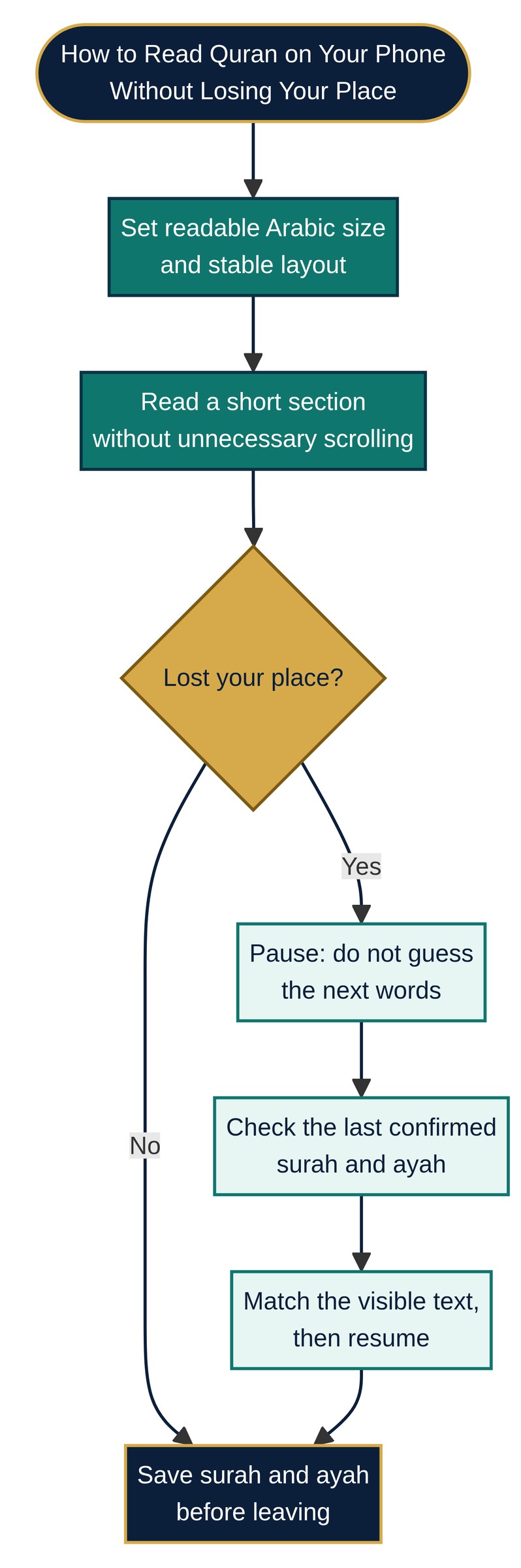
When you resume, read a few words before moving forward so the context feels continuous. Once you finish, update the saved reference before opening another panel, playing another track, or putting the phone away. If you are unsure how far you reached, return to the last ayah you definitely completed and label the following one as next to read. That honest boundary makes the next session simple.
A quick symptom, setting, and recovery check
| Symptom | Setting or habit | Recovery |
|---|---|---|
| Letters or marks look cramped | Increase Arabic size and verify a whole word is visible | Return to the last confirmed ayah; do not infer it from the line alone |
| Lines move after rotating the phone | Lock orientation and keep one page width | Match visible text to the saved surah and ayah |
| Panels hide the Arabic | Reduce translation or controls without removing identifying labels | Reopen the same edition and compare nearby text |
| Audio highlight feels ahead | Treat it as an ayah-level aid, not exact word tracking | Confirm the word or ayah in the text itself |
| A bookmark is missing | Test close-and-reopen behavior; note account or device status | Use the last written reference and save a new one |
A realistic interruption
Imagine that Sam reads on a bus, reaches the middle of a passage, and receives a call. The reader returns to a similar scroll position, but the screen has rotated and the audio highlight sits on a full ayah. Sam does not guess. The session note says “Al-Kahf 18:27 — completed; 18:28 — next to read.” Sam opens the same edition, checks the Arabic around 18:28, and resumes there. Before leaving, Sam saves the next confirmed boundary again. The recovery is straightforward because the note identifies a text location rather than a screen location.
If your reading includes recitation practice, keep that activity separate from location tracking. Feedback from a teacher may address a particular passage or recording, while a bookmark answers a different question: where should the text open next? Resources on recording recitation for teacher feedback and practising tajweed between lessons can support those practice needs without making the phone’s scroll state carry all the responsibility.
FAQ
Should I save a page number or an ayah?
Save the surah and ayah first. Add the page only as a secondary clue, because page numbers can change with the edition, script, or layout.
What if I cannot remember whether I finished an ayah?
Return to the last ayah you definitely completed and label the following one “next to read.” A short repeat removes ambiguity without requiring a guess.
Do bookmarks always sync between devices?
No assumption is safe across readers. Check whether your chosen reader saves to an account or only on the device, then test close, reopen, and (where relevant) another device.
Can I rely on an audio highlight?
Use it as a helpful guide, but confirm the text yourself. A highlight may represent a whole ayah rather than the exact word being read.
Short takeaways
- Choose a fixed orientation, font, and page width, then check that whole Arabic words and marks are visible.
- Reduce distracting panels, but keep surah, ayah, and edition labels available.
- Save a confirmed surah and ayah with separate “completed” and “next to read” labels.
- After an interruption, match visible text to that reference instead of trusting scroll position or audio highlighting.
- Test bookmark recovery once, and keep the method simple enough to use every session.